top of page

Support
Step 2: Upload
Click on any step or subsection to see support materials and media.

Upload Drone Data
After completing the flight mission, you can upload the captured images directly to FarmAnalyzer™.
Transferring Images to Your Computer
Either connect the drone to your computer using a USB-C cable or remove the SD card and use a card reader.
Uploading Images
-
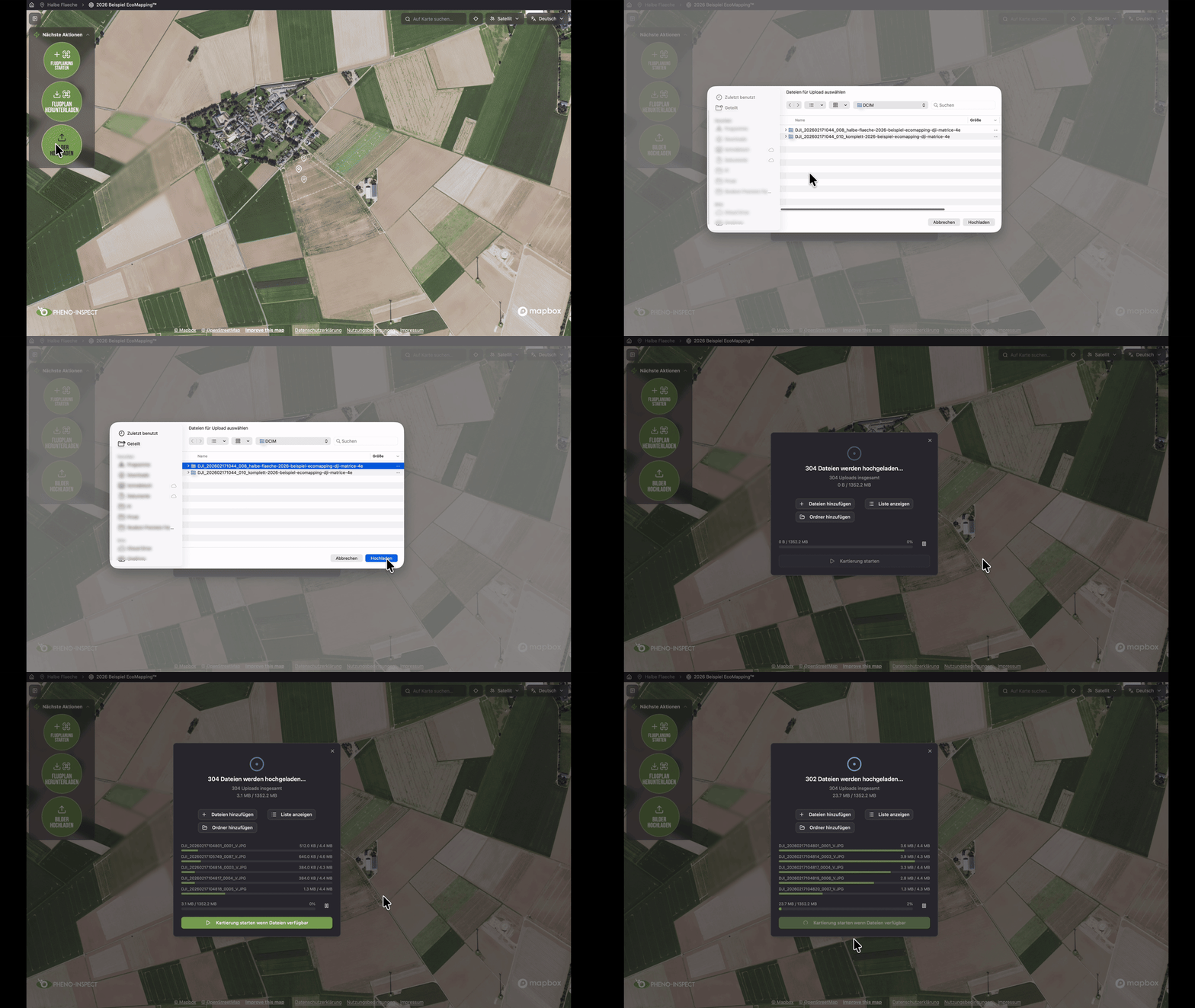
In FarmAnalyzer™, select the correct measurement
-
Then click "Upload Images"
-
Select "Add Folder"
-
Select the appropriate image folder on your storage device
-
Click "Upload"
The upload progress will be displayed immediately.
Start mapping automatically
If you enable the "Start mapping when files are available" option, processing will begin automatically once all images have been successfully uploaded.
UPLOAD DRONE DATA
Frequently asked questions
Getting Started
No FAQs yet
This category doesn't have any FAQs at the moment. Check back later or explore other categories.
.avif)
bottom of page